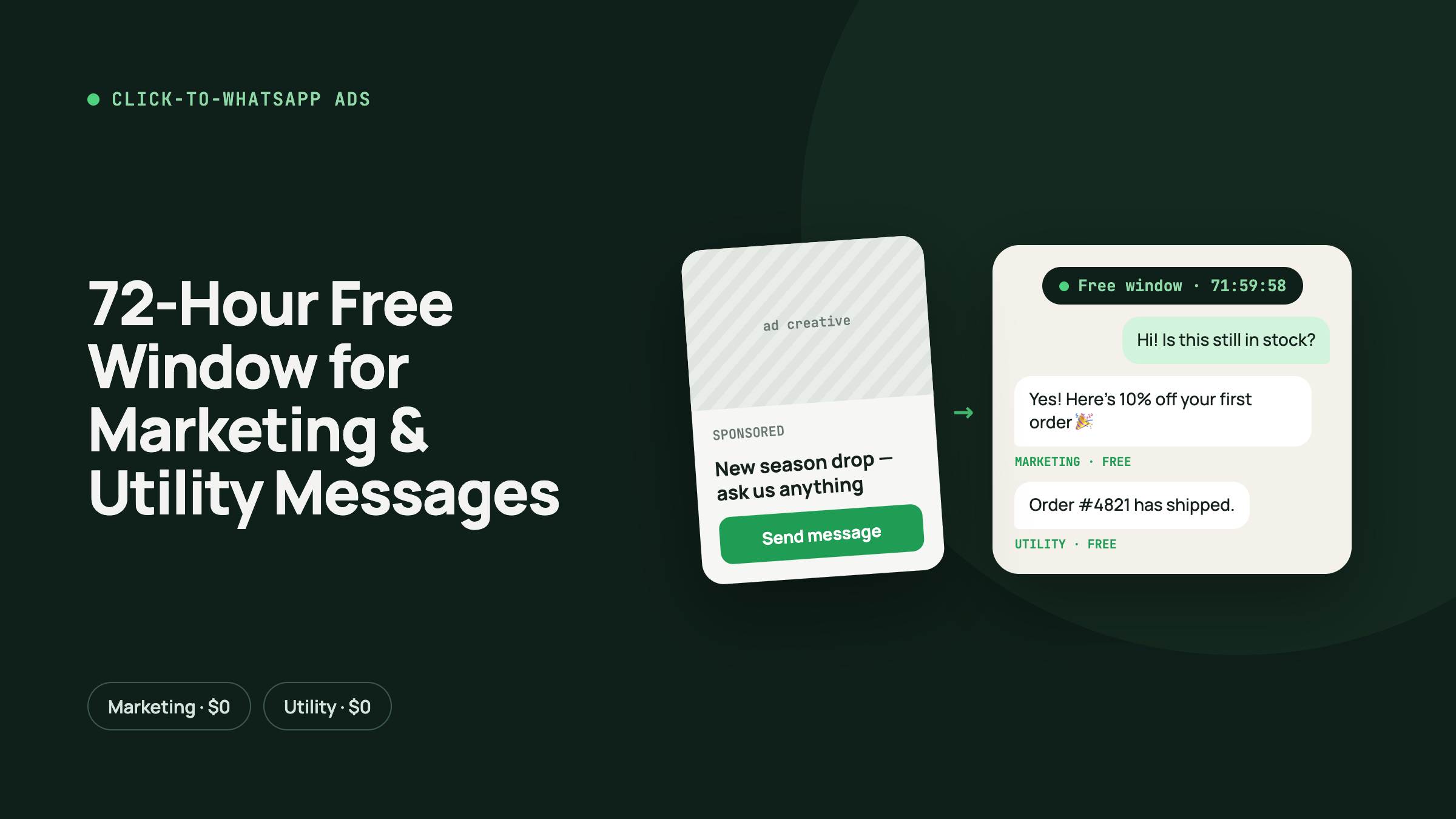
Short answer: When a customer taps your Click-to-WhatsApp ad on Facebook or Instagram and messages you, and you reply within 24 hours, Meta opens a 72-hour free entry point window. For those 72 hours, every message you send to that customer through the WhatsApp Business API is free: marketing templates, utility templates and normal service replies. Meta's October 2026 pricing update in India made service replies and in-window utility messages chargeable, but it did not change the free entry point window. That makes Click-to-WhatsApp ads one of the cheapest ways to run WhatsApp marketing in 2026.
Key takeaways
- Click-to-WhatsApp (CTWA) ads are Meta ads with a "Send WhatsApp Message" button. Tapping it opens a chat with your business.
- When the customer messages you from the ad and you reply within 24 hours, a 72-hour free entry point (FEP) window opens.
- Inside the window, marketing, utility, authentication and service messages are all free.
- From 1 October 2026, normal service replies in India cost money after 1,000 free per number per month, and utility templates inside the 24-hour window are no longer free. The 72-hour CTWA window is unchanged.
- You still pay Meta for the ad itself. The saving is on the messages that follow it.
What is a Click-to-WhatsApp ad?
A Click-to-WhatsApp ad is a normal Facebook or Instagram ad whose call-to-action opens WhatsApp instead of a website. You create it in Meta Ads Manager by choosing WhatsApp as the message destination and connecting your WhatsApp Business number.
When someone taps the button, WhatsApp opens with a pre-filled message such as "Hi, I'd like to know the price". Once they send it, the lead is in your inbox, with no landing page, form or bounce.
For Indian SMBs this matters because most customers already prefer chatting on WhatsApp to filling in a form. A CTWA ad cuts out the page in between and drops the customer directly into a conversation.
Where CTWA ads can run:
- Facebook Feed, Stories and Reels
- Instagram Feed, Stories, Reels and Explore
- A "WhatsApp" button on your Facebook Page also counts as a free entry point
How the 72-hour free entry point window works
Meta's pricing documentation describes this as a Free Entry Point (FEP) window. Here is the sequence:
- The customer taps your ad and sends the first message on WhatsApp (Android or iOS app).
- You reply within 24 hours. That reply is free, and it opens the FEP window.
- For the next 72 hours, all messages you send to that customer are free, whatever the category.
- After 72 hours, normal per-message pricing applies again.
Points that are easy to get wrong:
- The window starts when the customer sends a message, not when they tap the ad. A tap with no message opens nothing.
- You must reply within 24 hours. If you miss that, the free window never opens.
- The 72 hours do not reset when the customer keeps chatting. The window is fixed from the start.
- The 24-hour customer service window is separate. It can close while the 72-hour FEP window is still open. Inside the FEP window you can still send approved templates for free, but free-form (non-template) messages need the customer service window to be open.
- A new ad click after the window expires can start a fresh free window.
What is free inside the 72-hour window
| Message type | Normal price in India (from 1 Oct 2026) | Inside the 72-hour CTWA window |
|---|---|---|
| Marketing template (offers, catalogue, follow-ups) | ₹0.8631 per message (about US$0.0118) | Free |
| Utility template (order confirmations, booking updates, payment reminders) | ₹0.115 per message (about US$0.0014), including inside the 24-hour window | Free |
| Authentication template (OTP) | ₹0.115 per message (about US$0.0014) | Free |
| Service reply (normal chat reply by agent or chatbot) | First 1,000 per number per month free, then ₹0.115 each | Free |
Rupee rates are Meta's India rate card per delivered message, before 18% GST and before any platform fee or markup your WhatsApp API provider adds. Check Meta's current rate card before budgeting.
Marketing messages are the most expensive category, so this is where the window saves the most. A follow-up sequence of four or five promotional templates to every ad lead costs nothing if it all goes out inside 72 hours.
Example: what the free window saves in rupees
Say your Click-to-WhatsApp ads bring in 1,000 new leads in a month, and you send each lead 5 marketing templates and 2 utility templates (a quote and a payment confirmation).
| Messages | Outside the free window | Inside the 72-hour window |
|---|---|---|
| 5,000 marketing templates | 5,000 × ₹0.8631 = ₹4,315.50 | ₹0 |
| 2,000 utility templates | 2,000 × ₹0.115 = ₹230 | ₹0 |
| Total Meta message cost | ₹4,545.50 + GST | ₹0 |
The savings grow with every lead, and the chat replies to these leads don't use up your 1,000 free service messages either.
What changed in October 2026, and why the CTWA window matters more now
Until 30 September 2026, Indian businesses could reply to customers for free inside the 24-hour customer service window. Utility templates sent in that window were also free, a rule Meta added in July 2025.
From 1 October 2026:
- Service replies are free only for the first 1,000 per business phone number per month. After that, each reply costs ₹0.115, the same as a utility message.
- Utility templates inside the 24-hour window are now chargeable at ₹0.115 each, with no free tier.
- The 72-hour free entry point window is unchanged. Everything sent inside it is still free.
So for a business running WhatsApp ads, the cheapest way to talk to a new lead is now inside the CTWA window. Leads from your website, QR codes or organic chats use up your 1,000 free service replies. Leads from CTWA ads don't, for their first 72 hours.
Benefits of Click-to-WhatsApp ads for Indian businesses
1. Free marketing messages for 3 days
You can send offers, a catalogue, a discount code and a reminder without paying ₹0.8631 per marketing message, provided all of it goes out in the 72-hour window.
2. Free utility messages too
Booking confirmations, quotes, payment links, delivery updates and appointment reminders sent as utility templates are free in the window. After October 2026, these would otherwise be charged even inside the 24-hour window.
3. Service replies don't use your 1,000-message allowance
Chats with CTWA leads in the window don't count against your monthly free service replies, so the allowance lasts longer for your other customers.
4. Higher conversion than form ads
The customer is already talking to you. A salesperson or chatbot can qualify, answer questions and send a payment link in the same chat, with no call-back and no form.
5. Customers are opted in
The customer started the chat, so you have a clean opt-in for the conversation. That supports your template quality rating and lowers the risk of blocks and reports.
6. Ad-to-revenue tracking
The WhatsApp Business API passes the ad referral (ad ID, headline, source URL) with the customer's first message. A CRM can store it on the lead, so you can see which ad produced which sale.
A 72-hour follow-up plan that stays free
Plan your sequence so the important touches land well before hour 72. For example:
| Time after first message | What to send | Category |
|---|---|---|
| Within minutes | Instant welcome reply plus 2 or 3 quick-reply buttons (price, catalogue, talk to an expert) | Service |
| Hour 1 | Catalogue or product carousel | Marketing template |
| Hour 4 | Answer to common questions, or a short video | Marketing template |
| Hour 24 | Personalised offer or quote with a payment link | Marketing / utility template |
| Hour 48 | Social proof: reviews, before/after, case study | Marketing template |
| Hour 66–68 | "Offer ends today" reminder | Marketing template |
Keep the final message a few hours before the 72-hour mark so delivery delays don't push it into paid territory.
Common mistakes that lose the free window
- Slow replies. If nobody answers within 24 hours, the window never opens. Use an auto-reply or chatbot so every ad lead gets an answer in seconds.
- Not tracking the window start time. Without a timer on each lead, your team won't know when free messaging ends.
- Sending from the wrong number. The ad must point to the same WhatsApp Business API number you message from.
- Using the WhatsApp Business app instead of the API. Template pricing and the FEP window rules apply to the WhatsApp Business Platform (API).
- Spamming the window. Free doesn't mean unlimited goodwill. Too many promotional messages lead to blocks and a lower quality rating.
How BuyerNexus helps you use the 72-hour window
BuyerNexus is a CRM and WhatsApp Business API platform built for Indian SMBs, and a verified Meta Tech Provider. For Click-to-WhatsApp campaigns it lets you:
- Connect your WhatsApp number through Meta Embedded Signup.
- Capture every CTWA lead automatically, along with the ad it came from.
- Reply instantly with chatbot flows so the 24-hour reply deadline is never missed.
- Run automated 72-hour follow-up sequences of marketing and utility templates.
- Track each lead in the pipeline from first message to payment.
Start your Click-to-WhatsApp campaign with BuyerNexus →
FAQ
Are WhatsApp marketing messages really free for 72 hours? Yes, for customers who message you from a Click-to-WhatsApp ad or a Facebook Page WhatsApp button and receive your reply within 24 hours. All template categories are free for 72 hours from the start of that window, so you save ₹0.8631 on every marketing message and ₹0.115 on every utility message. You still pay for the ad.
Did the 1 October 2026 pricing change remove the 72-hour free window? No. The October 2026 update made service replies chargeable after 1,000 per number per month and made in-window utility templates chargeable. The free entry point window was not changed.
Does the 72-hour window reset if the customer keeps replying? No. It runs for 72 hours from when it opens. The 24-hour customer service window does reset with each customer message, but that is a separate window.
Do Instagram ads qualify? Yes. Click-to-WhatsApp ads on Instagram placements open the same free entry point window as Facebook ads.
Can I send free-form messages for all 72 hours? Only while the 24-hour customer service window is also open. If the customer has been silent for more than 24 hours, use an approved template. It's still free inside the 72-hour window.
Is the free window available on the WhatsApp Business app? The per-message pricing and free entry point rules apply to the WhatsApp Business Platform (API). Use an API provider such as BuyerNexus to get the benefit.
Pricing information is based on Meta's WhatsApp Business Platform documentation and the October 2026 India pricing update. Meta changes rates and rules from time to time, so check the official rate card before planning a campaign budget.